
Billing
The Billing page is where you manage account funds and review charges generated by API usage. It covers three main areas: your current balance, how you add funds (one-time or recurring), and your billing history (ledger entries).
This page is designed for operational finance visibility: keeping the account funded, understanding how costs accumulate, and reviewing recent charges when needed.
Add funds
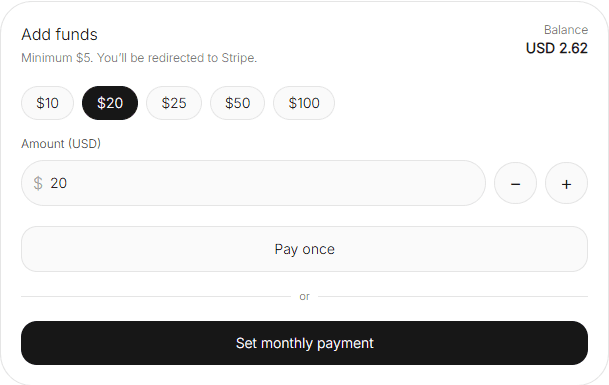
Use Add funds to top up your account. The flow typically redirects to a payment provider (for example, Stripe) to complete the transaction securely.
The interface usually offers:
- Preset amounts (for example, $10, $20, $25, $50, $100) for quick top-ups.
- A custom Amount field to enter an exact value.
- A minimum amount requirement (for example, “Minimum $5”).
This is a simple operational control: if you anticipate usage spikes, top up in advance to avoid running the account too close to zero.
One-time payment vs monthly payment
You can generally choose between:
- Pay once: a single top-up. Best when usage is irregular or you prefer manual control.
- Set monthly payment: recurring funding. Best when usage is stable and you want predictable account maintenance.
A practical approach is to start with one-time payments while you learn your baseline usage, then switch to a monthly payment once your spend pattern becomes predictable.
Billing settings
Billing settings show the finance-related configuration for the account, such as currency and the billing contact. This is where you confirm “who” the billing is associated with and “how” amounts are represented.
- Currency: the currency used for balance and ledger entries (for example, USD).
- Account: the billing contact reference (for example, an email address).
If you need invoice details or billing changes that aren’t self-serve in the dashboard, the page typically points you to support or documentation.
Billing history
Billing history (or ledger entries) is an activity log of charges applied to your balance. It’s designed for traceability: you can see when charges happened, what type they were, and what triggered them.
A typical ledger table includes:
- Date: when the entry was recorded.
- Type: for example, Charge.
- Amount: the billed amount (negative values typically represent consumption).
- Note: contextual details such as provider + model + request type (for example, chat openai/gpt-4o-mini).
When troubleshooting spend, the Note field is often the fastest indicator of what drove the cost: which provider, which model, and whether it came from chat or another request type.
Next: review overall activity in Panel or configure models and request parameters in API Management.