API Management
API Management is where you configure the core API behavior: which provider and model to use, how responses should behave (temperature and output limits), and which embeddings model is used for vector workflows. It also provides a usage overview so you can monitor request volume and model-level consumption.
In practical terms, this page covers two areas: API Configuration (settings) and API Data (usage).
API Configuration
The API Configuration section defines your default provider and model behavior for chat and embeddings requests. These settings are typically used by the Platform when processing requests, routing, and tool calls that depend on model access.
Provider
Choose the provider that will serve model requests (for example, OpenAI). Provider selection affects which models are available, how usage is reported, and where costs are attributed.
Language model
Select the default language model used for chat completions. This impacts response quality, latency, and cost. In most setups, this acts as the “default model” unless a specific agent or workflow overrides it.
Temperature
Temperature controls response variability. Lower values tend to be more deterministic and precise; higher values produce more diverse and creative responses.
- Use lower temperature when outputs must be consistent (support flows, structured answers, operational tasks).
- Use higher temperature when exploration is valuable (brainstorming, creative rewriting, multiple options).
Max output tokens
This limit caps the maximum length of model responses. It’s a safety and cost control lever: lower limits keep outputs tight and predictable; higher limits allow more detailed responses at a higher cost.
If you notice responses getting cut off, increase the max output tokens. If you want tighter cost control, keep it conservative and encourage agents to produce structured summaries.
Embeddings model
The Embeddings Model is used for vector operations such as semantic search, similarity matching, and retrieval workflows. If your system uses RAG or any vector-based indexing, this choice matters for both quality and cost.
A common operational pattern is to use a cost-efficient embeddings model for high-volume indexing, while keeping the chat model optimized for the user-facing experience.
Save changes and test
After updating configuration, click Save changes to persist updates. Use Test API to validate that:
- The provider connection is working.
- The selected model responds as expected.
- Token limits and temperature settings behave correctly.

API Data
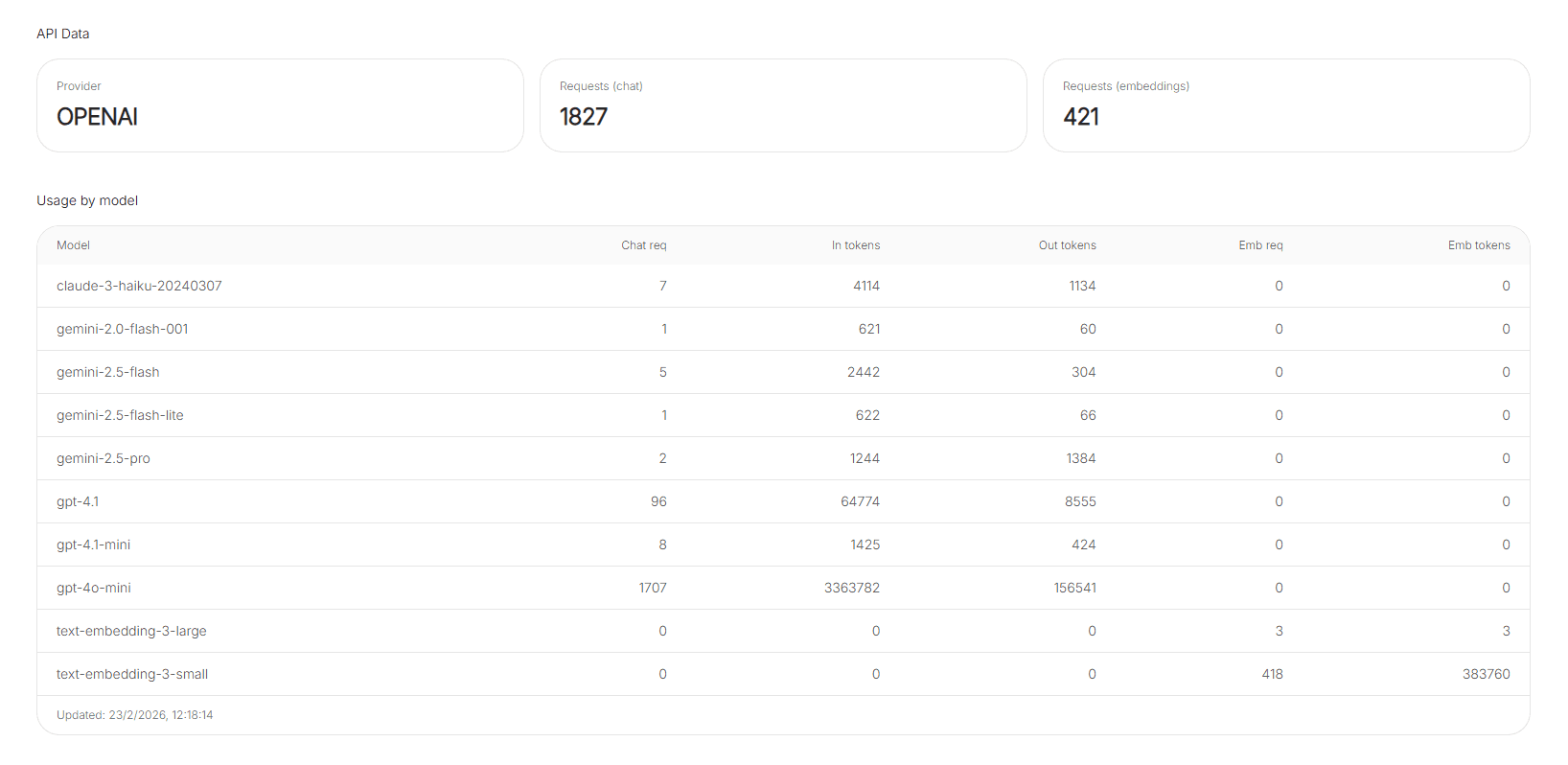
The API Data section shows usage metrics over a defined period (for example, recent activity or 30-day usage). It helps you monitor volume, validate adoption, and spot changes after configuration updates.
Requests (chat and embeddings)
Requests are typically broken into two types:
- Requests (chat): language-model interactions.
- Requests (embeddings): vector-related calls (indexing, search, similarity).
If embeddings requests are unusually high, it may indicate heavy indexing activity, frequent re-indexing, or a retrieval workflow that can be optimized.
Usage by model
Usage by model breaks down consumption per model, often including:
- Chat requests
- Input tokens and output tokens
- Embedding requests and embedding tokens
This table is useful for answering questions like: “Which model is driving most of the token usage?” or “Did switching the default model change token consumption?”